Durable work items that people and Agents share. A card says what is open, who has it, and what it waits for. Chat App owns the board, the card, its history and who can see it. Agent Platform turns an assignment into a wake and runs the Agent turn. Site-defined templates add typed fields, a gated stage graph, card keys and saved views, so a board can be a team’s real tracker.
01What Boards are, and why
Automations need a place to record work that outlives one turn: what is open, who has it, and what it waits for. A board is that place. People and Agents read and write the same cards through one validation path.
A card can be a task, a reminder to check something later, a handover from one Agent to another, or a handover from an Agent to a person. The core is small on purpose: four coordination statuses (open, waiting, done, cancelled), one assignee, an optional person the card waits on, an optional wakeAt, a Markdown body and an append-only history. There are no dependencies, claims or relations between cards.
Coordination Chat App · on the card
Intent and responsibility: title, body, status, assignee, waiting-on person, wakeAt, revision, template fields and stage, comments and history.
The card answers “who must act now, and on what?”
Execution Agent Platform · linked
Wake fires (queued, staged, running, settled), admissions, the Flue conversation and delivery. Run state is derived from the linked fires on every read and is never written to the card.
A card’s run state is its starting or running wake when one exists, else its newest wake.
A card is not a run record. An Agent keeps its per-response plan in update_plan. A card is for work that crosses turns, Agents or people. This keeps the card truthful: an Agent can never leave a card that says “running” after its process died.
Lessons from the market (research of October 2026)
- Execution ledgers do not survive; work items that link to runs do. OpenClaw added a SQLite Tasks ledger with a task-flow layer, then removed all of it (“each runtime owns execution and completion”). Its Kanban Workboard plugin, with Agent assignees and links to sessions, survived.
- Derive Agent state, do not let the Agent set it. Linear makes the Agent the issue’s delegate while a person stays accountable, and derives the Agent session state (
active,awaitingInput,error, …) from emitted activity. - “Needs a human” is a state, not a product. A2A
INPUT_REQUIRED, MCPinput_requiredand the waiting-for-user states of coding agents all model it on the work item. Standalone agent-inbox products were archived or deprecated. Boards model it aswaitingpluswaitingOnUserIdand a badge. - Fixed generic tools plus a schema read. Notion, monday, Airtable, Jira and OpenProject expose custom fields through generic tools, a describe-schema call and server-side validation, not per-tenant tool schemas. Boards do the same, so tool lists stay stable for prompt caching.
02What it enables
Each scenario uses the same six tools, the same card, and the same wake pipeline. Only the actor and the destination change.
Delegate to a named Agent
A person creates a card on a Project board and assigns it to a named Agent that is a member of the Project. The Agent wakes at once in a card thread inside the Project, reads the card with card_get, comments its result and finishes the card.
Agent → Agent handover
Inside a woken turn, an Agent assigns a card to another Agent. The new wake gets the next causal depth. The causal person must hold invoke on the target. Above depth 3 the assignment is recorded but no wake starts (depth_exceeded), so loops stop by design.
Agent → person handover
The Agent sets status: waiting and waitingOnUserId. The person sees the attention badge. Only that person, or a board manager, can clear the wait. Their comment wakes the assigned Agent and returns the card to open.
“Check later”
An Agent assigns a card to itself with a future wakeAt. Self-assignment never wakes at once; the future time is a reminder. The fire sleeps durably and wakes the Agent at that time, also when the Agent is running then (a queued follow-up).
Recurring work
A Job (recurring schedule) is shown on a board as a schedule card with its timing, next run and last result. Each run can create an occurrence card with card_create, for example a weekly review assigned to a person. There is no second recurrence engine.
Slack and Telegram
The Personal Assistant in a DM, and a named Agent in a room or DM, use the same tools. An assignment made there by the same presence delivers the wake result back to that conversation through the existing external schedule destinations. “Waiting on you” is not pushed to Slack or Telegram; it is a badge in Chat.
Industry template: a CPG commercial team
The default site ships a commercial-tasks template (“Commercial team tasks”, card key TASK) that models a category-management team in consumer goods retail. It was shaped by a fit check against a customer’s own dashboard prototype; the template itself is generic.
| Business concept | How the template models it |
|---|---|
| Task type | Required select with colour and icon per option: Losses, Revenue, Price positioning, Assortment, Suppliers, Promo, Merchandising. The board view groups cards by it inside each stage column. |
| Product direction | select: Fresh, Dairy, Grocery, Beverages, Household. |
| Weighted commercial goals | multiselect whose options carry scalar attributes, for example Margin growth {weight: 20, priority: 1, owner: Category Director}. Agents read the attributes in board_get; the option picker shows them as one short line. Core does not compute scores from them. |
| Prep start, start, finish | Three datetime fields. start has role start, finish has role due: a past due value on an unfinished card shows an Overdue badge. |
| Labor hours, TO %, FM %, TR % | number fields; the three effect metrics have help text (turnover, front margin and traffic change in percent). |
| Budget | money with currency EUR, stored as an exact decimal string. |
| Reviewer | person field (a local Chat user; a ControlTower id is accepted and mapped). |
| Workflow | Stages Not started → In progress → In review → Done, plus Cancelled. Entering In review requires labor_hours and finish. Done and Cancelled are terminal and can reopen. |
| Views | Board (stage columns, type sub-groups), Table (14 columns), and My tasks (filter assignee: me). |
A typical flow: a category manager creates a card of type Losses for the Dairy direction and assigns it to a named analysis Agent. The Agent reads the template with board_get, writes its findings as a comment, fills labor_hours and to_pct, moves the card to In review, and sets it to wait on the reviewer. The reviewer replies on the card, which wakes the Agent again.
03System architecture
The split follows authorization. Chat App already owns the membership directory, Project membership and Agent grants for Skills, so it owns boards. Agent Platform owns only the wake and the execution it starts, and it never reads chainlit tables.
- People ↔ Chat: REST under
/boards/api; socket eventsboard_attentionandboard_changedback. - Site Git → Chat: init step
22_postsboard-templates.yamltoPOST /admin/board-templates/import. - Chat → Agent Platform: after the card commits,
POST /v1/management/board-wakesin the same request; board reads list wakes with oneGETper board. - Agent Platform → Chat: before staging, the fire calls
board-wakes:check; then it stages the turn into the card thread. At named-Agent admission, Agent Platform asks Chat to sign a board context (named-agent-boards:authorize). - Kernel tools → Chat: every board read and write goes through
chat-context-tools:executewith the turn’s authority. - Chat → Agent Platform: on each named-Agent tool call Chat reverse-confirms the signed context (
named-agent-boards:validate) and reads the Agent’s own Jobs (:schedules). - External channels: inbound turns carry board authority; a wake assigned from a channel delivers back to it.
04Data model
Four Prisma models in the chainlit schema, with logical references only (no physical foreign keys), and three columns on one Agent Platform table. Physical checks and unique indexes hold the invariants that would otherwise need code.
| Model | Key columns | Invariants and notes |
|---|---|---|
Board |
placeKind (personal · project · agent), placeId, isDefault, name (nullable), ownerUserId, access JSONB, templateId, nextCardNumber, deletedAt |
One live default board per place (unique partial index). Chat creates it on first use, without a stored name; the UI shows a localized name. Default boards cannot be deleted and have no template. templateId is set at creation and never changes. |
BoardCard |
title, Markdown body, status, assigneeKind/assigneeId, waitingOnUserId, wakeAt, wakeAuthorizerUserId, revision, creator, fields JSONB, stageKey, cardNumber, kind, scheduleRef, sourceScheduleTaskId, internal metadata |
CHECK: status = 'waiting' exactly when waitingOnUserId is set. CHECK: a schedule card has a scheduleRef and no assignee, waiting or wakeAt. Unique (boardId, cardNumber). One live schedule card per Job taskId. Partial indexes back the attention query. |
BoardCardEvent |
kind, actorKind/actorId, body, payload, idempotencyKey, requestHash, toolResult |
Append-only history and comments. Actors: user, Personal Assistant, Project Assistant, named Agent, or system for a wake that Agent Platform skipped. An Agent mutation stores its key, hash and result on its first event (unique key); a no-op stores a hidden tool_receipt. |
BoardTemplate |
slug, version, definition JSONB, definitionHash, access, retiredAt |
Slug unique among live rows. The definition is the normalized YAML entry without access; its hash is SHA-256 of canonical JSON. access controls who can create boards from it, not who can see boards. |
agent_task_fireagent_platform |
trigger_kind (schedule · board_card), board_card_id, board_executor_key; agent_task_id now nullable; intent in fire_payload (requestId, boardId, revision, depth, authorizer, destination) |
CHECK: a board fire has a card and executor and no agent_task_id, so it never appears in Jobs. Unique partial indexes per (tenant, card, executor): one queued, and one staged/running. Unique on requestId makes the POST idempotent. |
Status vs stage
Status (open · waiting · done · cancelled) says who must act now. Wakes, waiting-on and attention read only status. Stage (from a template) is the business position, for example “In review”. They change independently, with one link: terminal stages set done or cancelled.
Card keys
Card creation takes the next number with UPDATE "Board" SET "nextCardNumber" = "nextCardNumber" + 1 … RETURNING inside the insert transaction, so the board row lock orders numbers. Keys read TASK-12 on a templated board and #12 elsewhere.
Migrations: apps/chat/chainlit-datalayer/prisma/migrations/20261006130000_agent_boards, 20261007120000_board_templates (which also numbers existing cards per board), and apps/agent-platform/packages/db/migrations/0048_agent_platform_board_card_fires.sql.
05Access and authority
Boards use the shared resource_access primitive with the policy read < contribute < manage. One board has one audience; there is no per-card visibility. The place a board lives in adds implied access on top of explicit grants.
Grants go to users, teams, groups and Agents. Agent grants are agents: [{id, generation, permission}], bound to the Agent ownership generation like Skill grants, so a change of ownership invalidates them. Anything granted to an Agent can appear in any turn of that Agent, the same as its Knowledge and Skills.
Place-implied access
| Place | Implied access |
|---|---|
| Personal | Owner only. |
| Project | Project participants contribute, Project managers manage. Implied access ends when the board leaves the Project. |
| Agent | Agent managers and trainers manage. The Agent itself contribute. People who only invoke the Agent get nothing from the place. |
Per-presence reach
| Presence | Acts with | Reaches |
|---|---|---|
| Personal Assistant | Its user’s live permissions, on every surface. Capped at contribute. | Every board its user can read. |
| Named Agent | Only its own grants. Never the permissions of the person who invoked it. At most contribute. | Its default board, boards of Projects where it is a member, explicit Agent grants. |
| Project Assistant | The Project, capped at contribute. It has no principal, so it cannot be an assignee. | Only boards placed in its Project. |
Rules on every surface
Assignment never shares
The assignee must already be able to read the board, or the assignment is refused. The UI then offers the share dialog. Responsibility never widens an audience.
Only the awaited person clears waiting
Only the person in waitingOnUserId, or a board manager, clears a waiting state. A comment by anyone else does not reopen the card or wake the Agent. An Agent can set a wait and comment, but cannot answer for the person.
Agents cannot create or share boards
No tool creates, shares or deletes a board, and Agents cannot link or remove schedule cards. Board structure is a human decision.
Named Agents see only their own Jobs
On a schedule card, a named Agent sees details only for Jobs it owns. It never sees the invoker’s private Jobs; the Project Assistant sees no Job details.
The signed named-Agent board context
A named Agent in a Slack room has no Chat session to borrow authority from, and it must never use the invoker’s. So Chat issues a capability that names the Agent itself.
- Agent PlatformAdmission asks Chat to authorize
At admission, Agent Platform calls Chat
named-agent-boards:authorize. Chat signs anamed-agent-boards-v1context bound to the Agent, its ownership generation and the admission, with an expiry. - AgentEach tool call carries the context
The kernel tool sends the signed context through the chat-context bridge. Chat checks the signature and the expiry.
- Chat AppReverse confirmation
Chat confirms with Agent Platform
/v1/chat/named-agent-boards:validatethat the admission is live, the same pattern as Skill reads. Schedule-card details use/v1/chat/named-agent-boards:scheduleswith the same context.
Workbench sessions, memory dreams and unlinked channel guests get no board context. A linked channel user who never opened Chat gets a local user row at that point, so they can be an assignee or an awaited person.
06Agent tools
Six kernel tools with fixed schemas (apps/agent-platform/packages/kernel/src/tools/chat-context/board-tools.ts). There are no per-template tools: a template is discovered at run time with board_get, so the tool list stays stable for prompt caching.
| Tool | Kind | What it does |
|---|---|---|
board_list | read | Boards the turn can reach, with open and waiting card counts. |
board_get | read | One board and its cards (status filter, cursor). On a templated board also the template: fields with type, required, role, currency, options and option attributes, and the stage graph. Labels carry en-US and the turn locale only. |
card_get | read | The full card: body, fields, stage, allowedNextStages with blockedBy, comments, history, assignee, waiting state, wakeAt, revision, the Agent runs it started, and the schedule summary for schedule cards. |
card_create | write | Create on a board the turn can contribute to: title, body, assignee (self · user · agent), waitingOnUserId, wakeAt, fields, stageKey. |
card_update | write | Change any of the above plus status. Requires expectedRevision; a changed card refuses the update and the Agent reads it again. null unassigns or clears. |
card_comment | write | Add a Markdown comment: progress, a question or a result. |
Idempotent writes
Every mutation is keyed by (admissionId, toolCallId) with a hash of the request. Chat stores the key, the hash and the result on the first event the write creates.
- A replay with the same hash returns the stored result, also after later changes to the card.
- A replay with a different hash is refused.
- A no-op update stores a hidden
tool_receiptevent, so even “nothing changed” replays exactly.
This matters because a durable turn can retry a tool call after a crash, and a card write can wake an Agent or notify a person.
Errors the model can act on
A refused write is HTTP 400 with code: board_card_invalid, a message that names every issue, and issues: [{field | stage, problem, allowed?}]. The tool error carries it, so the next call can correct itself. A wake that does not start is named in the tool result (wakeOutcome).
Not in context
Board content is never added to the turn context. Agents pull it with the tools. Chat renders each board tool step with the card title and a link to the card.
Where the tools work
| Surface | Board authority |
|---|---|
| Chat thread turns (also scheduled and board-woken turns) | boardAccess block in the chat-context snapshot: presence, Project, causal person and depth. |
| Personal Assistant DMs (Slack, Telegram) | The same block in the signed external personal context. |
| Named Agents in Chat, rooms and DMs | The signed named-agent-boards-v1 context (section 05). |
| Helper subagents, delegated child executions | None: card changes wake Agents and notify people. |
| Workbench sessions, memory dreams, unlinked guests | None. |
07Wakes, step by step
A wake is an agent_task_fire row with trigger_kind = 'board_card'. It reuses the Absurd fire task, Chat staging, admission and delivery of schedules, but not their lifecycle, recurrence, active hours or pause-on-failure.
What starts a wake
- Assigning a card to an Agent, at once, unless
wakeAtis in the future. - A comment by the person the card waits on: the card returns to
openand the assigned Agent wakes. - A manual wake from the card by a person; it raises the card revision.
- Changing
wakeAton an assigned open card: a future time schedules a wake, clearing it wakes now.
Commit first, then request, in the same request. If the call to Agent Platform fails, the route returns the error with the committed card, built from Chat data only, and the card shows no linked fire, so a person can wake it again. There is no reconciler or background repair: the failure window is visible and bounded.
A wake that does not start is never silent. The card response carries wakeOutcome (requested, or suppressed with depth_exceeded or live_wake_exists); the card records wake_suppressed or wake_failed with its reason; an Agent’s tool result names the outcome.
Fire-time checks
Before staging, the fire asks Chat board-wakes:check: the card must still be open with the same assignee, the authorizing person must still hold contribute, and the Agent must still reach the board. An exact revision match is not required, so a title edit does not cancel a pending wake. Agent Platform then checks invoke, the Agent state and its ownership generation. A failed card check skips the fire (Chat records wake_skipped with the system actor); a failed Agent check fails it. Deleting an Agent cancels its live board fires.
Follow-up wakes
A card can have one queued wake in addition to one that is starting or running (staged or running) for the same executor. So a reply by the awaited person, an Agent’s own reminder and a new wakeAt during a running turn all produce a wake.
- A request for a higher card revision cancels the queued wake as
superseded. - A request at the same or a lower revision gets
live_wake_exists. - A queued wake that comes due while the earlier one still runs waits durably: rechecks start at 5 s and double up to 2 min for the first 30 min, then every 10 min. After 24 h it is skipped with
earlier_wake_unsettled.
Why wait instead of run in parallel? Chat does not serialize two turns in one card thread. A second turn staged before the first has answered would start a separate Agent conversation in the same thread. Two unique partial indexes make “one queued + one active” a database fact, not a code convention.
Bounds, payer and destination
Depth and self
- Each fire carries a causal depth. An assignment to another Agent inside a woken turn gets the next depth; a reminder to self keeps its depth.
- Depth above 3 records the assignment but starts no wake.
- An Agent-made assignment to another Agent needs the causal person’s
invokeon the target. - Assigning a card to yourself never wakes you at once.
Authorizer and payer
- The authorizing person is who assigned the card, or the causal person when an Agent assigned it. A comment wake keeps the current authorizer; a manual wake uses the person who asks.
- An invoker-funded Agent and the Personal Assistant are paid by that person’s teamless personal key. A sponsor-funded Agent pays from its own key.
- A Personal Assistant wake runs on the person’s account default profile, which must work with an organization-scope key.
Destination, fixed at assignment
- From Chat: a card thread with a fixed id, one per card and executor (and per person for direct named-Agent threads), inside the Project for Project boards, else a direct task thread with the authorizing person.
- From Slack or Telegram by the same presence: back to that conversation via external schedule destinations. A named-Agent DM qualifies only with an active scheduled-DM binding; otherwise a Chat card thread.
08Templates
A template is declarative data in the site repository: typed fields, an optional stage graph with gates, a card key prefix and saved views. Core validates and renders it; nothing in a template executes code. Boards then hold stable business state as well as coordination state.
Anatomy
site-bootstrap/default/board-templates.yaml — excerpt of commercial-tasks (lines elided with # …)
boardTemplates:
  - slug: commercial-tasks
    version: "1.0"
    cardKeyPrefix: TASK
    label:
      en-US: Commercial team tasks
      ru: Задачи коммерческой команды
      pl: Zadania zespołu handlowego
      de-DE: Aufgaben des Commercial-Teams
      es: Tareas del equipo comercial
      fr-FR: Tâches de l'équipe commerciale
    # description: … (all six locales)
    access:
      all: true
    fields:
      - key: type
        type: select
        required: true
        label: {en-US: Task type, ru: Тип задачи, pl: Typ zadania, de-DE: Aufgabentyp, es: Tipo de tarea, fr-FR: Type de tâche}
        options:
          - key: losses
            color: red
            icon: trending-down
            label: {en-US: Losses, # …}
          # revenue, price_positioning, assortment, suppliers, promo, merchandising
      - key: goals
        type: multiselect
        options:
          - key: margin_growth
            color: emerald
            icon: chart-line
            attributes: {weight: 20, priority: 1, owner: Category Director}
          # loss_reduction, price_index, availability, q4_revenue, …
      - key: start
        type: datetime
        role: start
      - key: finish
        type: datetime
        role: due
      - key: labor_hours
        type: number
      - key: to_pct
        type: number
        help: {en-US: Turnover change in percent, # …}
      - key: budget
        type: money
        currency: EUR
      - key: reviewer
        type: person
    stage:
      initial: not_started
      stages:
        - key: not_started
          next: [in_progress, cancelled]
        - key: in_progress
          next: [in_review, not_started, cancelled]
        - key: in_review
          next: [done, in_progress]
          requiresFields: [labor_hours, finish]
        - key: done
          terminal: done
          next: [in_progress]
        - key: cancelled
          terminal: cancelled
          next: [not_started]
    views:
      - key: board
        kind: board
        groupBy: stage
        subGroupBy: type
        columns: [type, direction, finish, labor_hours, assignee]
      - key: table
        kind: table
        columns: [cardKey, type, direction, goals, stage, assignee, reviewer, start, finish, labor_hours, budget, to_pct, fm_pct, tr_pct]
      - key: mine
        kind: board
        groupBy: stage
        subGroupBy: type
        filter: {assignee: me}
# every field, stage and view also has a six-locale label
Identity: a stable kebab-case slug, a publisher version label, a cardKeyPrefix ([A-Z]{2,8}), a label, an optional description, and access in the site grant syntax (all, or groups and teams by !Ref). The default site also ships a simpler team-tasks template (TEAM): type, priority with a rank attribute, due date, and To do → In progress → Review → Done.
Field types
| Type | Value |
|---|---|
text · longtext | String. |
number | Number. |
money | Decimal string; one ISO 4217 currency per field. |
date · datetime | YYYY-MM-DD; ISO timestamp with offset. One of them can have role start, one role due (drives overdue). |
boolean | true or false. |
select · multiselect | Option key(s). Options have a key, a label, an optional colour, an optional icon from the fixed Lucide list BOARD_TEMPLATE_ICONS, and optional scalar attributes. |
person | Local Chat user id. A ControlTower id is accepted; Chat creates the local row first, as for an assignee. |
url | URL string. |
Field keys match [a-z][a-z0-9_]{0,39}. Any field can be required; after every write all required fields must have a value.
Stage graph
terminal: done stage, so every card can finish. Purple dashed edges are reopen moves.Write rules: one validation path
The UI routes, REST and the Agent tools all call create_board_card() and update_board_card() in chainlit/boards/board_cards.py, which validate with board_templates.py.
- A
fieldspatch sets the keys it names;nullclears a key; unknown keys and invalid values are refused. - A card starts in the initial stage, so that stage’s
requiresFieldsapply at creation. A create with anotherstageKeyis a move from the initial stage. - A move must follow
next, and the target’srequiresFieldsmust have values after the same write. - Entering a terminal stage sets its status and clears waiting. Leaving one sets
open. On a staged board,doneandcancelledcome only from terminal stages; a direct status change is refused with their names. In a terminal stage, status and waiting-on are read-only. - The card dialog and the board view take these locks from one frontend helper,
boardCardStatusRules(). The card form sends only the fields a person edited, so a value the form cannot show exactly (seconds of a datetime, an Agent’s value) does not change or block an unrelated save. - History records
fields_changed(before and after of changed keys) andstage_changed(from,to).
Views
At least one view; the first is the default. A board view groups by stage (or by status without a stage) and can collapse cards into subGroupBy select groups with counts. A table view lists columns: field keys plus the built-ins assignee, status, stage, cardKey and updatedAt. A view can carry a fixed filter (stages, statuses, assignee: me). The board read returns all cards; views and ad hoc filters apply on the client. There are no per-user saved views.
Import, re-import and retirement
Init step 22_ imports board-templates.yaml through POST /admin/board-templates/import as the board-templates entity, after Skills and the membership directory sync (SITE_BOOTSTRAP_IMPORT_MODE_BOARD_TEMPLATES: replace or skip). The YAML is the whole live set: the import creates, updates and retires templates. validate_board_template_definition() rejects any error with its YAML path.
| Refused (HTTP 409, lists card keys and problems) | Applies at once |
|---|---|
|
To make a breaking change, the site ships a dbmate data migration that changes the affected cards; the next import then succeeds. Values are never reinterpreted. |
Known, accepted gap: a card write that runs at the same moment as an import can still use the old definition. Imports run only at deployment.
Localization
Every label, help text and description must contain all six Chat locales: en-US, ru, pl, de-DE, es, fr-FR. The UI resolves a label the same way the backend resolves the app catalog: the exact locale (ru-RU), then its language (ru), then en-US. Agents get en-US plus the turn locale only.
FDE workflow
- Write the template in the customer site repository
board-templates.yamlwith six-locale labels. Site Git is the only authoring path; there is no template editor in the UI. - Ship the procedure as Skills, and the Agents that work the board
Skills explain the customer’s rules (“promos above the threshold need finance review”). Named-Agent profiles get the Project membership or Agent grant that lets them reach the boards.
- Import at deployment
just init-configruns step22_; a refused import names the cards to migrate. Breaking changes ship with a dbmate data migration in the same change. - Keep enforcement where it belongs
If a workflow must change an external system with binding checks (ERP posting, budget release), build a domain MCP service and register it in
mcp-tools.yaml. That service enforces the action; the board coordinates it.
09Schedule cards and occurrences
Recurrence is Jobs. A board does not get its own recurrence engine; it gets a read-only window onto a Job, and the cards the Job’s runs create.
A schedule card is a card with kind = schedule and scheduleRef = {taskId, owner: {kind: "assistant"} | {kind: "agent", agentId}}. It has no assignee, waiting, wakeAt, fields or stage, and never wakes an Agent; a database check enforces this. One live schedule card exists per Job.
- Link: from the Jobs editor (“Show on board”) or from a board (“Add recurring card”, which opens normal schedule creation, then links).
POST /boards/api/{boardId}/schedule-cardsneedscontributeon the board and the caller must be able to read the Job through the Agent Platform managementGETas themselves. A cancelled Job cannot be linked. - Remove:
DELETE /boards/api/cards/{cardId}removes a schedule card only; the Job does not change. Task cards are cancelled, never removed. - Close: cancelling the Job through the Personal Assistant or named-Agent cancel route (also the
task_cancelworkspace action) sets the cardcancelledwith aschedule_removedevent. A Job that ends another way leaves the card open, showing the Job’s lifecycle.
Run state is read, never stored
A board read fetches schedule summaries from Agent Platform as the viewer, one call per distinct owner (load_board_schedule_summaries()). The card carries schedule: {name, timing, timezone, lifecycleState, nextNominalFireAt?, lastFire?} or null when details are unavailable to that viewer.
Visibility follows the execution identity (board_schedule_visible_to_actor()): a person and their Personal Assistant see Jobs the person can read; a named Agent sees only its own Jobs; the Project Assistant sees none.
Occurrence cards
A schedule fire admits as task:{taskId}:{fireId}. When card_create runs in that turn, Chat takes the task id from the validated admission id and stores it in sourceScheduleTaskId. The schedule card lists up to 20 occurrence cards, newest first, on boards the viewer can read.
On the board, schedule cards sit in a Recurring section, never in task columns, and cannot be dragged. Cards of ended Jobs stay in a folded “Ended” group and can still be removed. Agents cannot link or remove schedule cards.
10Attention badge and live updates
One query, two socket events, and no notifications outside Chat.
board_attention
The badge counts cards the user can read that wait on the user, plus open cards assigned to the user. Chat computes it with one query (backed by two partial indexes) and pushes board_attention to the user’s sessions when a card change affects them. The attention page lists the same cards.
board_changed
Every card change and comment pushes board_changed to connected people who read the board through grants, ownership or a Project. On an Agent board only the Agent’s owner is added, from one Agent Platform lookup; its other managers and trainers see the change when they next open the board. A skipped wake notifies only the people the card names.
Pushes never block work. They run after the change commits, so a push failure never fails or delays the change or the wake check. Fan-out is bounded: no per-user Agent Platform calls. There is no push to Slack or Telegram; a Slack-only person asks their Personal Assistant.
11UI tour
Screenshots of the local demo stack (demo user, default site templates, demo data). Chat App has a Boards section in the navigation rail with the attention badge, a sidebar pane of reachable boards, and board pages; Projects and Agent pages show their default board. Select an image to open it at full size.
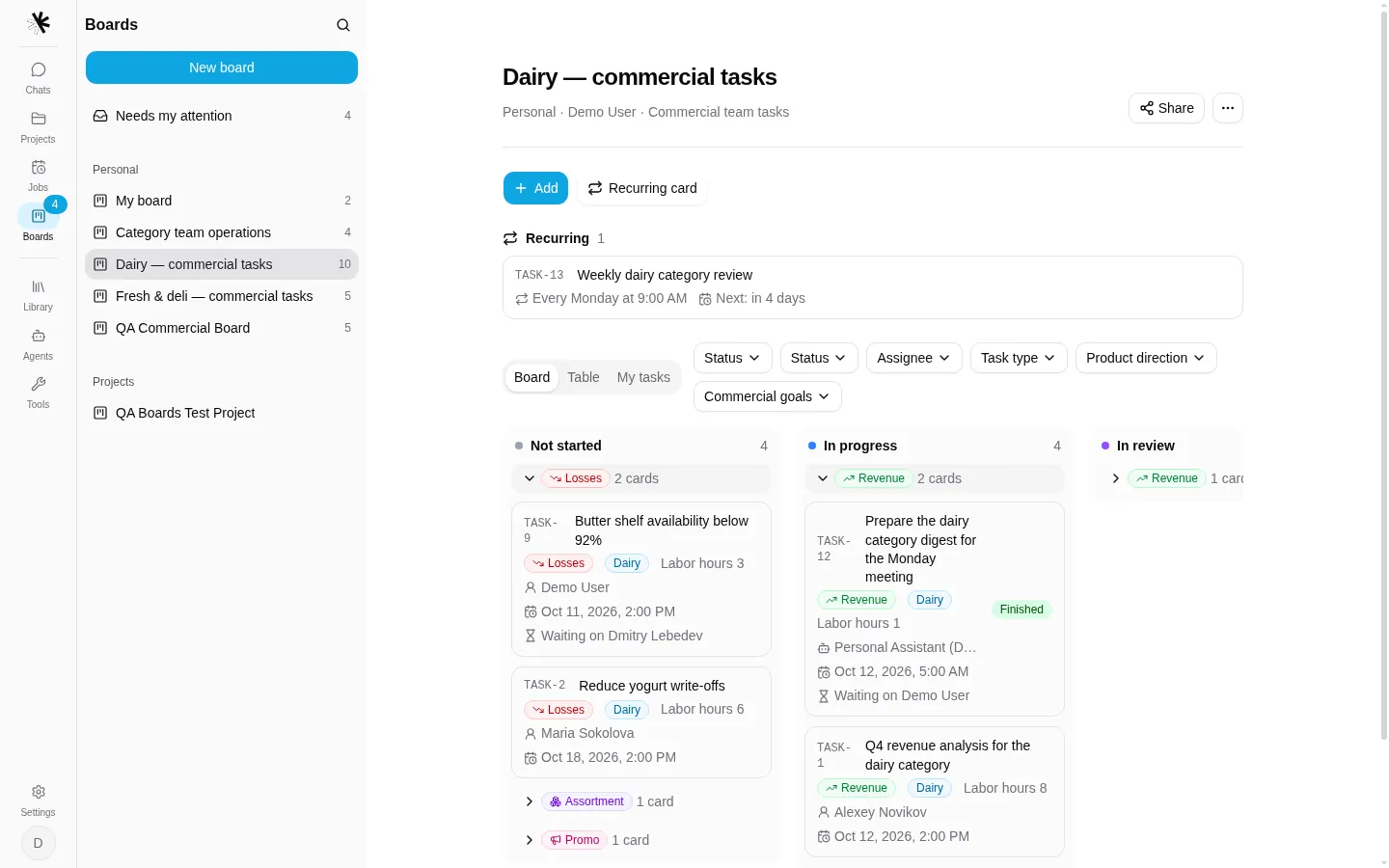
commercial-tasks board: stage columns, cards collapsed into task-type sub-groups with counts, card keys (TASK-9), template fields on the card face (type, direction, labor hours, finish), the assignee, and “Waiting on”. The schedule card TASK-13 sits in the Recurring strip, not in a column. TASK-12 shows its derived run state (“Finished”) next to its coordination state (waiting on the demo user).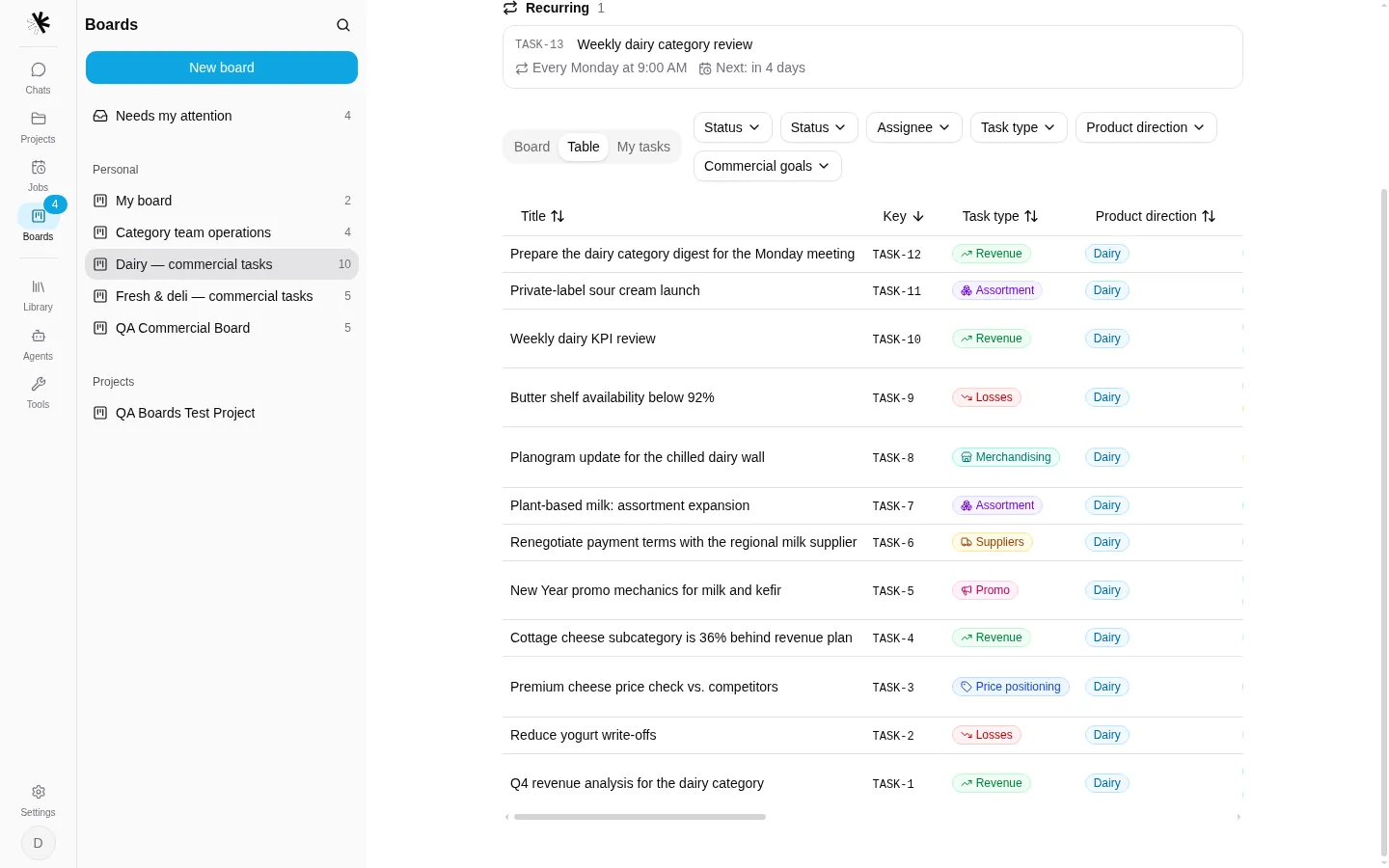
table view: one row per card, sortable columns from the view’s columns list (14 in this template; the rest scroll horizontally).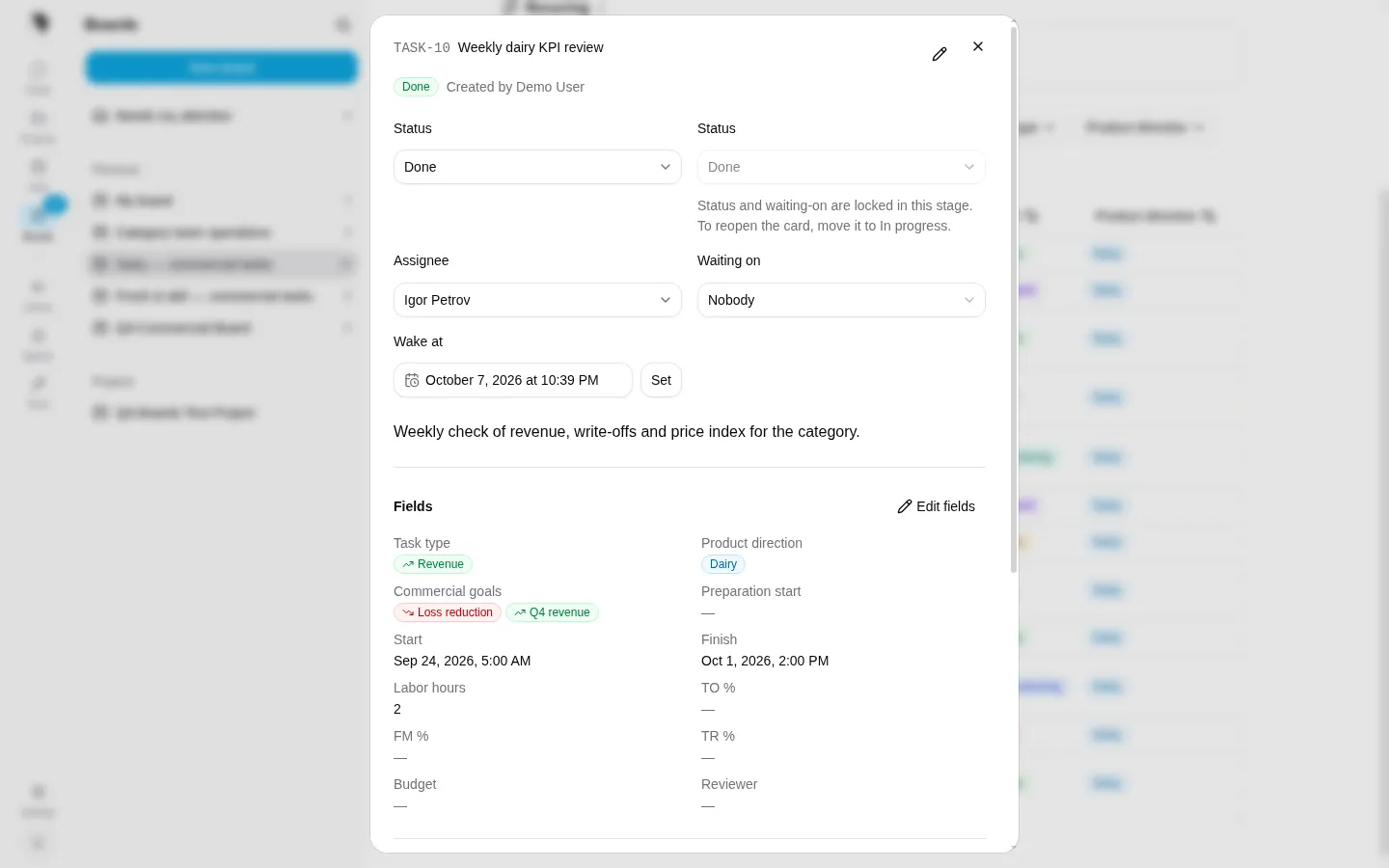
TASK-10 is in the terminal stage Done, so status and waiting-on are locked and the dialog names the reopen move (boardCardStatusRules()). Below: the generated form for the template fields.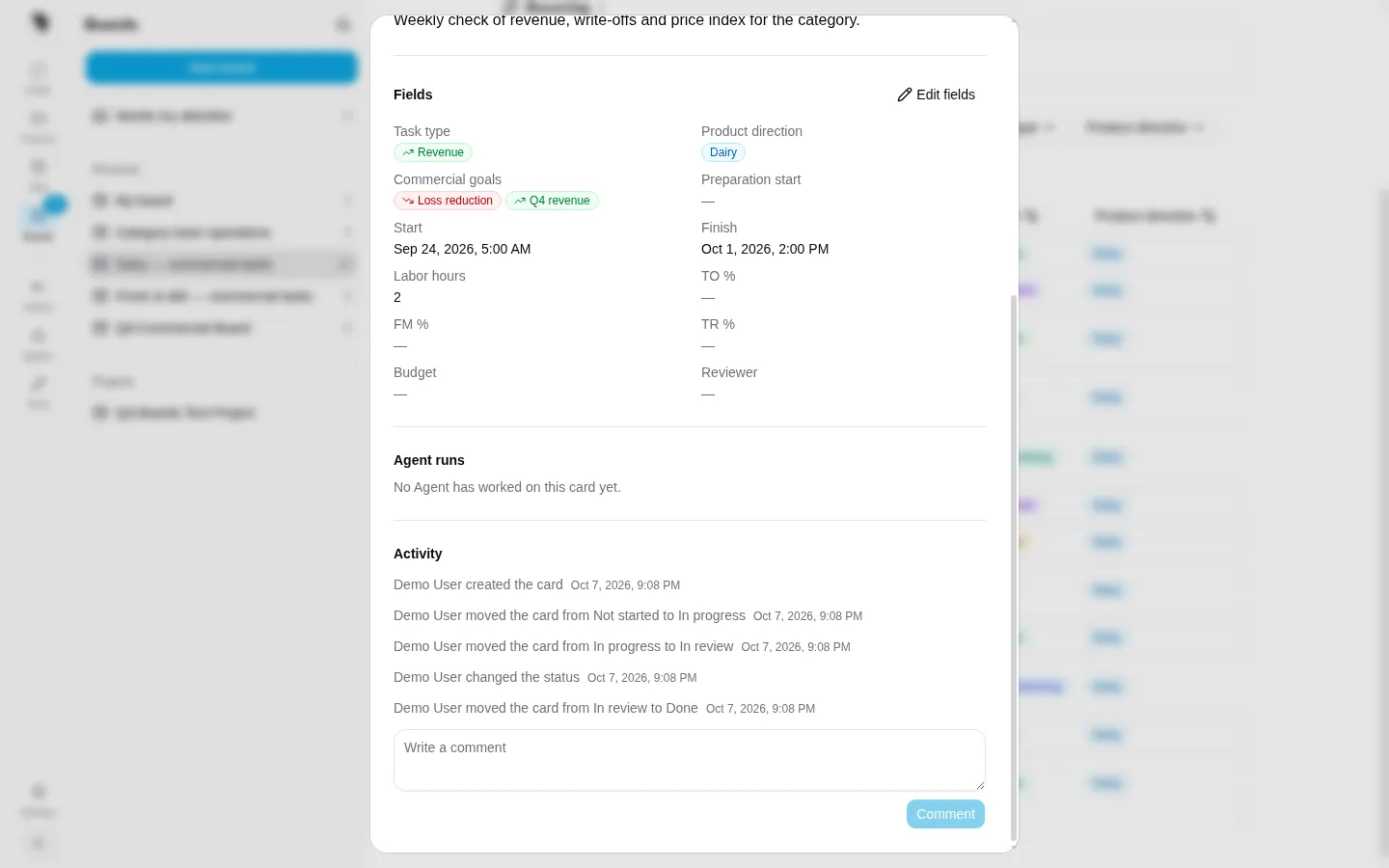
BoardCardEvent history with stage_changed entries for every move, the Agent runs section (empty here) and the comment box.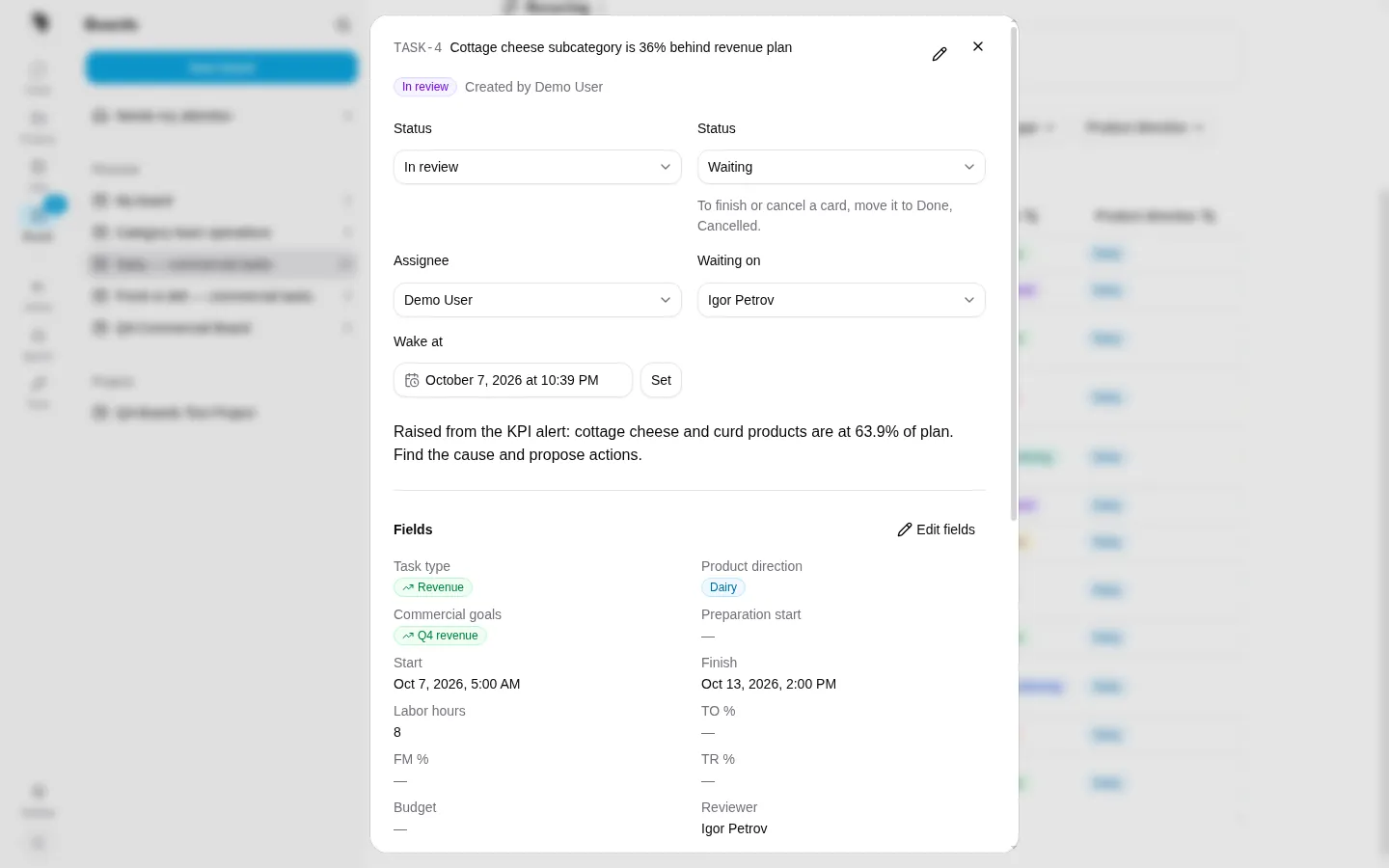
TASK-4 is in the business stage In review while its coordination status is waiting on the reviewer. Stage and status are independent. Only the reviewer, or a board manager, can clear this wait; the reviewer’s comment wakes the assignee if it is an Agent.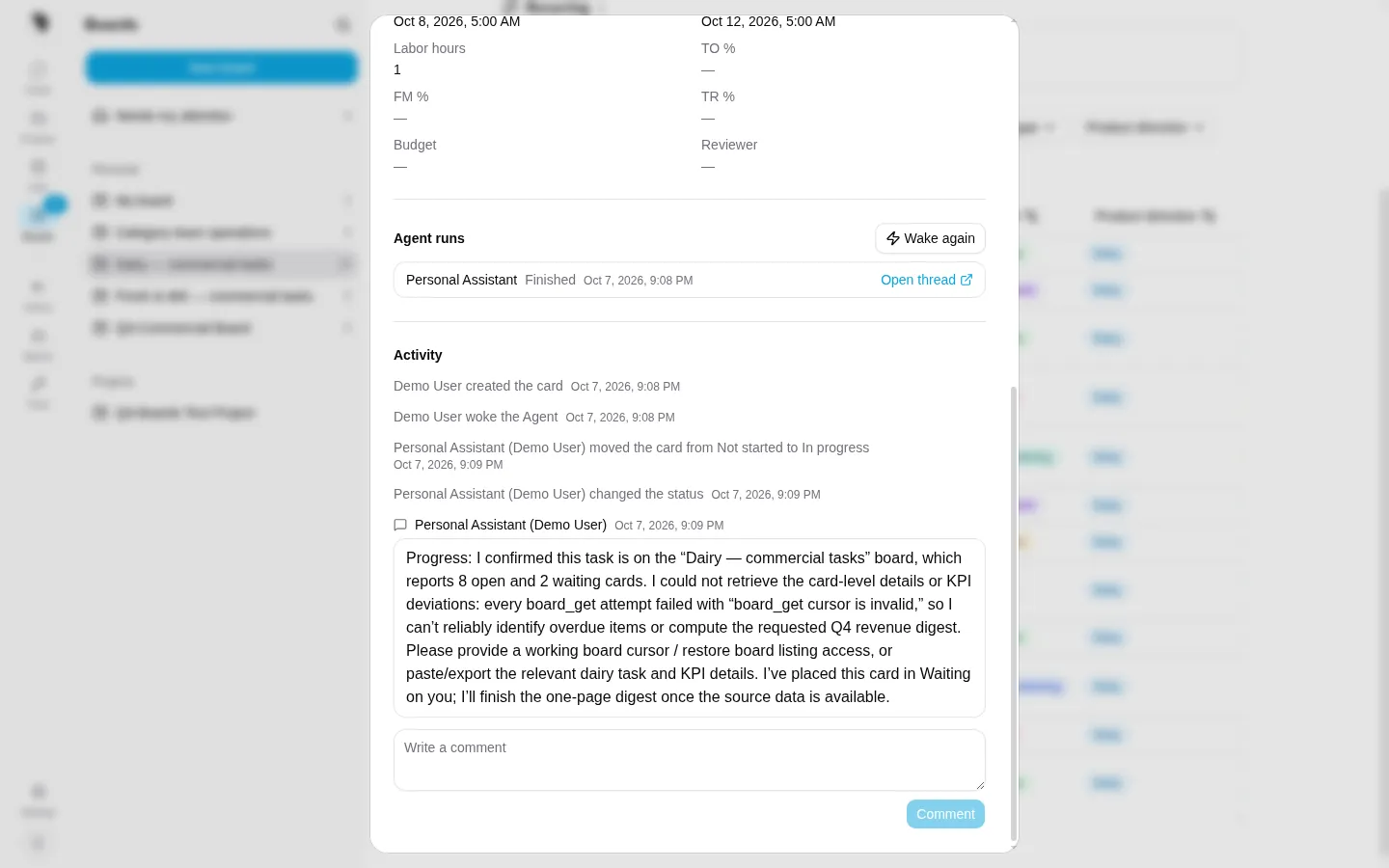
TASK-12 after a manual wake: the run row is a linked fire with its derived state and a link to the card thread; “Wake again” requests a new wake. The Personal Assistant moved the stage, then handed the card back to the person with waiting. Note: the comment reports a board_get cursor is invalid error. That is an open bug found while preparing this page (section 13), and the handover behaviour shown is the designed fallback.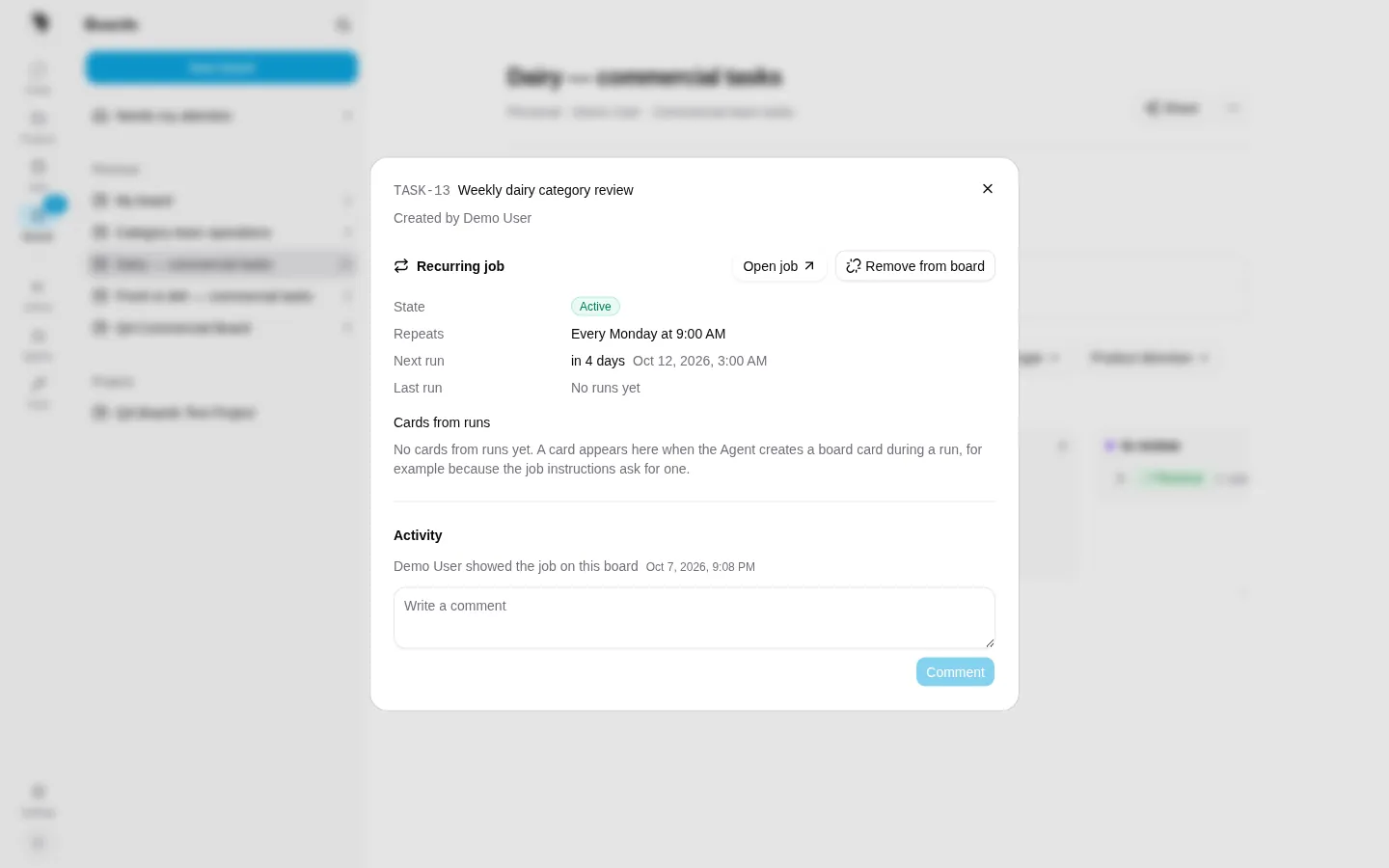
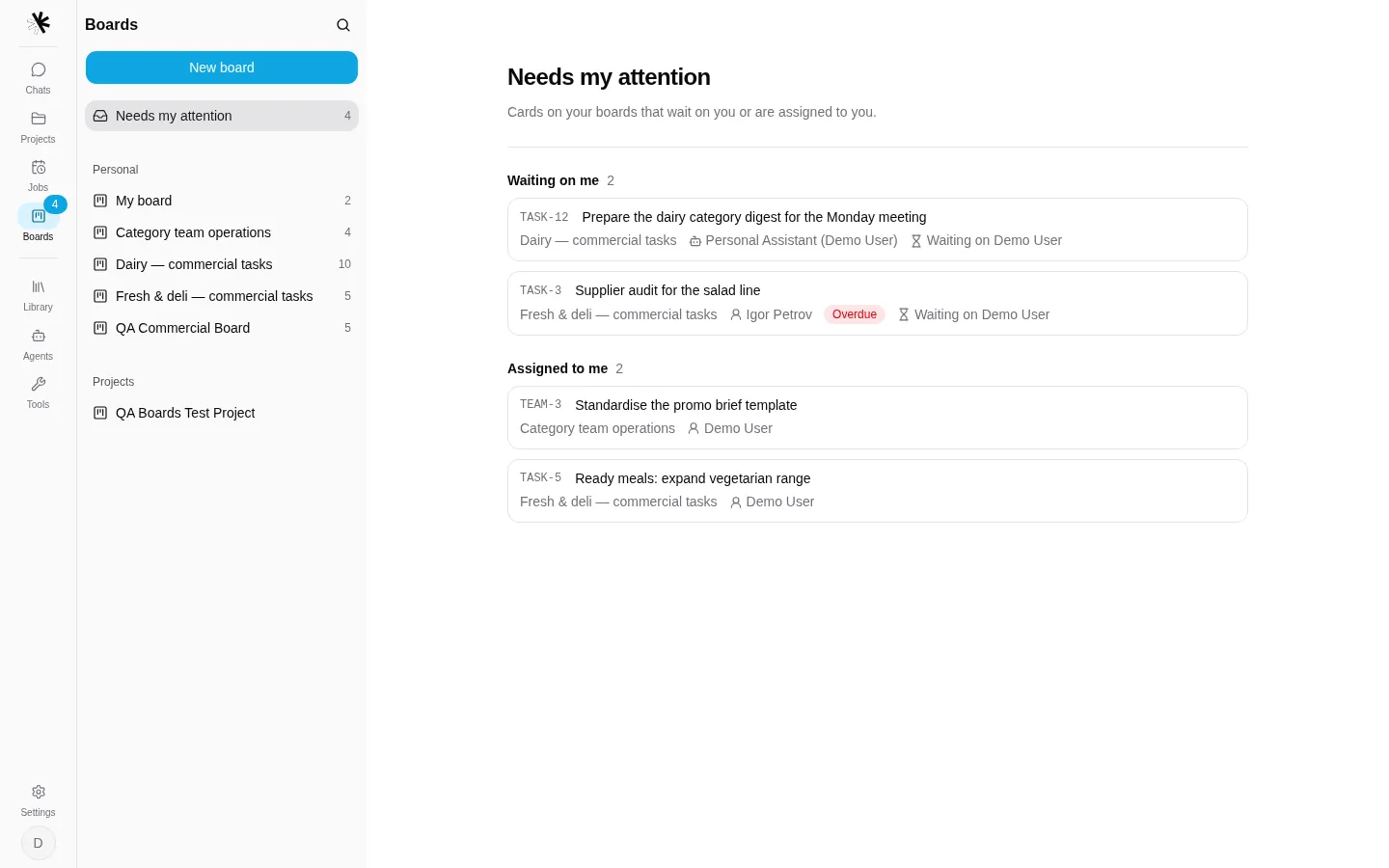
TASK-3 shows the Overdue badge from its due-role field.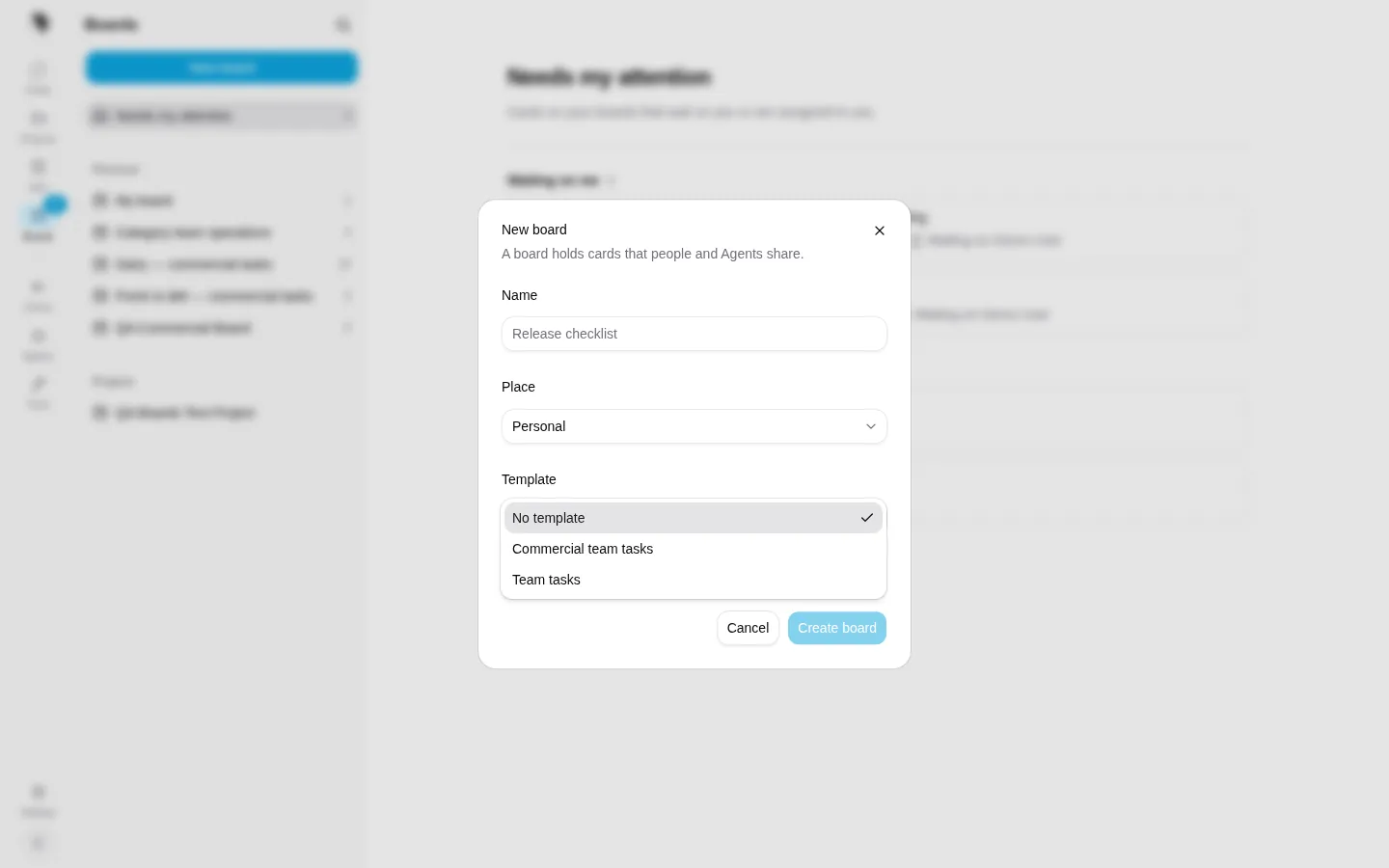
access grant includes the user. The template is fixed for the life of the board.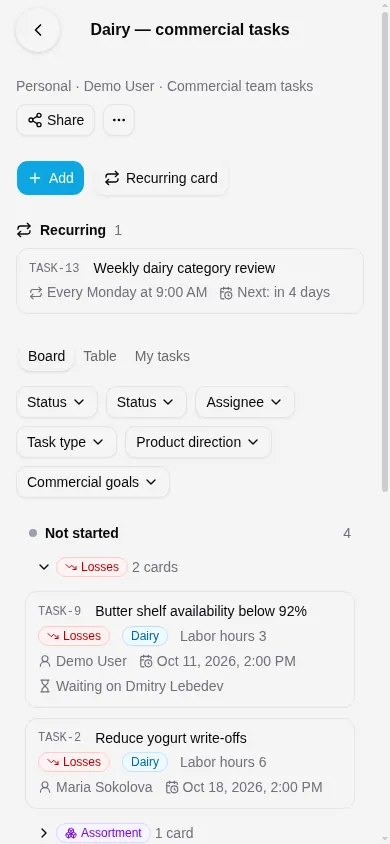
e7988ddce7).12Intentionally not built, and Phase 2
Owner decisions: Boards provide human-visible coordination and stable business state. They are not a binding enforcement system for external business actions. Customers are assumed to have no tracker, so the native board must be rich enough to be one.
Not built, by decision
- Card dependencies, claims, leases and relations
- An execution ledger or Agent-maintained run status on the card
- Per-card visibility; Agents creating or sharing boards
- UI-authored templates, workflow designer, scripts, formulas, automation rules, SLAs
- Per-template tools; board summaries injected into context
- Push notifications to Slack or Telegram for “waiting on you”
- Two-way sync with external trackers; an in-process plugin runtime; a bundled third-party tracker
- Card attachments (first release); per-user saved views
- A background reconciler for failed wake requests
Phase 2
- Decision records. Decision kinds (for example
finance_approval) with outcomes and a decider group; an append-onlydecisionevent by an authenticated person with a snapshot of covered fields; decision gates on stages; a decision goes visibly stale when a covered field changes. Agents can read and request, never record. - Agent proposals with Apply. An Agent proposes field or stage changes; the card shows Apply or Reject for a person; Apply runs the normal gates.
- Cross-board views. One template view over all boards of that template the viewer can read, for team leads and directors.
- Workload and timeline. Sum of a number field by assignee with bands; a timeline over start and due roles.
Later, on demand
- External tracker events. For customers who keep a tracker as system of record: an external-event trigger kind on the same fire pipeline, with an authenticated source, a scoped destination (one Agent, thread or Project), event-id deduplication and live authority checks. MCP event support needs verification first.
- A first FDE vertical with a domain MCP service and an inline MCP App, to prove the enforcement boundary.
- MCP App mounts in the card panel (needs viewer-based admission), card relations, attachments, plugin packaging of templates and Skills.
13Status
Branch local, not merged
- branch
agent/agent-boards, no upstream- commits
- 9:
34ae278c56…8c959836b8 - size
- 166 files, +22.6K / −0.35K lines
- design
agent-platform-boards.md,agent-platform-board-templates.md
Test coverage
- Integration API:
test_boards.py,test_board_templates.py - Integration websocket (real assistant turns):
test_board_agent_tools.py,test_named_agent_board_tools.py - Unit:
tests/unit/chatapp/test_board_templates.py - Agent Platform: board-wakes unit + integration, kernel board-tools, admission fixtures
- Frontend: presentation, template fields and views
Review
- Design debated by two independent reviewers (Fable, Astra) before each phase.
- Both reviewed the core and the template commits; every confirmed finding was fixed in the follow-up commits.
- Browser QA on the demo stack drove the UI fixes in
2d23843d47ande7988ddce7.
Found while preparing this page, fixed in 8c959836b8.
- A Gemini-based Personal Assistant sent
cursor: ""toboard_getand every read failed. Board tools now treat an empty optional string as “not provided”, so it can never change data;nullstill clears. An invalid cursor now tells the model how to recover. - The
commercial-tasksstage is now labelled “Stage”, so it no longer collides with the coordination status. - Schedule cards name the Job’s time zone and show next and last runs in the viewer’s time with its zone.
- Card keys stay on one line; done, cancelled and waiting cards explain why they cannot be woken.
After these fixes the five board test modules pass (34 tests) on the demo stack. Shipping needs a PR into the collaboration branch, CI and Dark Review.